How to Stay Focused While Using YouTube for Work or Studying
YouTube can be one of the best places to learn. It has tutorials, technical talks, lectures, walkthroughs, and explanations for almost anything, but it is also built to keep you watching. You can navigate to YouTube with a clear goal, then lose an hour to recommendations, Shorts, and autoplay before you finish what you set out to do.
To stay focused while using YouTube for work or studying: decide what you are there to watch before you open the site, remove the surfaces that pull you away, and end the session when the task is complete. This guide walks through each step, and none of them require quitting YouTube.
Why YouTube breaks focus
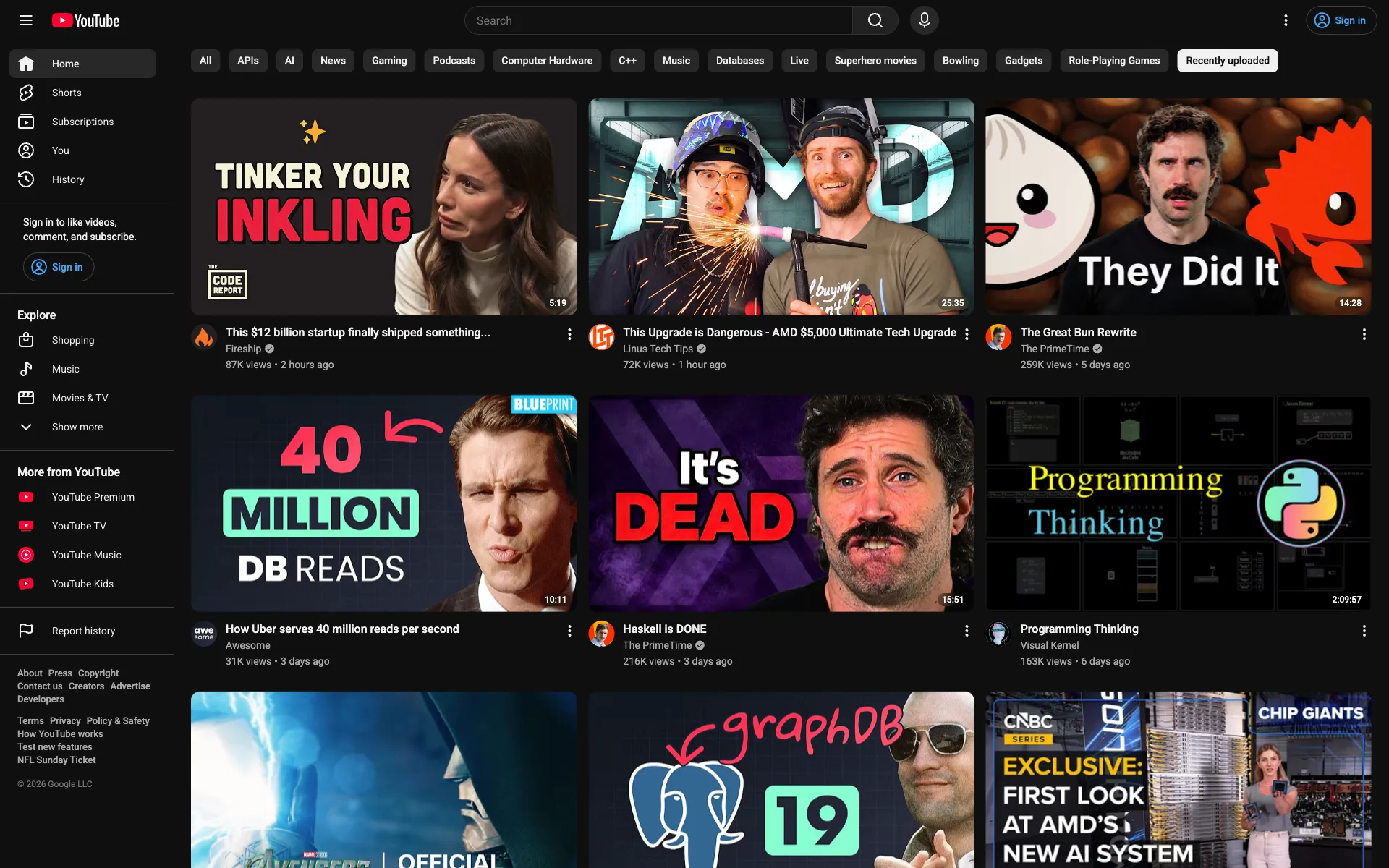
Useful videos and distracting ones share the same screen. You might open YouTube to learn a new tool, watch a lecture for class, follow a coding tutorial, or research a problem at work. Before you reach that video, the interface serves:
- A personalized homepage full of unrelated recommendations
- Suggested videos beside the one you meant to watch
- Shorts built for rapid scrolling
- Autoplay queuing another video after yours ends
- Comments and notification prompts that invite more browsing
Each of these adds a decision, and each decision is a chance to drift from the original task. A focused workflow removes those decisions so your attention goes to the video and to the work that follows it.
Start with a specific goal
Before you open YouTube, define what you are trying to accomplish. A vague intention gives you nothing to finish:
I am going to study calculus.
A concrete outcome tells you when you are done:
I am going to watch a 20-minute video on integration by parts
and work through two practice problems.
The difference is a stopping point: with a specific goal, you know what "done" looks like before the recommendations start competing for your attention. Here is a template you can reuse:
My goal: [what I need to learn, watch, or solve]
My next action after watching: [what I will build, write, or test]
Time limit: [example: 25 minutes]
Psychologists call these plans implementation intentions. Across a meta-analysis of 94 studies, people who decided the what and when of a goal in advance followed through far more often than people who stopped at "I want to."
Open the video directly
If you know what you need, skip the homepage. The catch: on standard YouTube, the search bar sits on top of the homepage, so the feed loads before you can type. You have three ways around it:
- Search from your browser's address bar: type the video topic, run the web search, and click the video result, which opens the watch page without the YouTube homepage ever loading. Chrome can also search YouTube from the address bar after a one-time setup: in Settings, open Search engine, then Manage search engines and site search, and add or activate YouTube under Site search.
- Open a saved link instead of browsing, since a video from your class page, your notes, or a watch-later list loads with no feed in between.
- Turn on Toobie's Focus mode, which replaces the homepage with a search field, so there is no feed to skip in the first place.
However you get there, the workflow is the same: search for the exact topic, open the video you chose, and watch it with your goal visible, taking notes or applying the information as you go. Once the task is complete, leave.
For a class topic, that might look like:
Task: understand integration by parts.
Video: [title or URL]
Afterward: solve problems 1 through 5 from chapter 7.
This beats browsing "calculus videos" and hoping something useful surfaces. You choose the destination before the feed can choose one for you.
Remove the distractions
The steps above cost willpower, and willpower runs out. The stronger move is to make the distractions unavailable while you work: create a version of YouTube that supports the reason you opened it. In studies led by psychologist Angela Duckworth, students who changed their environment to remove temptations met more of their academic goals than students who tried to resist the same temptations in the moment.
Hide recommendation surfaces
Recommendations have a place when you are exploring a topic on purpose, but they earn nothing when you arrive with a task. These are the surfaces worth hiding:
- The homepage feed
- Suggested videos next to the player
- End-screen recommendations
- Shorts
- Comment sections, if they pull you into scrolling
Search, direct links, and your saved videos stay, because the goal is not to block learning content but to remove the parts of the interface that keep changing your plan.
Use Toobie for intentional viewing
We built Toobie, a free Chrome extension that does the hiding for you. It has two modes: Chill leaves YouTube alone, while Focus reskins it so the homepage becomes a single search field and a video page shows the video without suggested videos, comments, or Shorts anywhere on it.
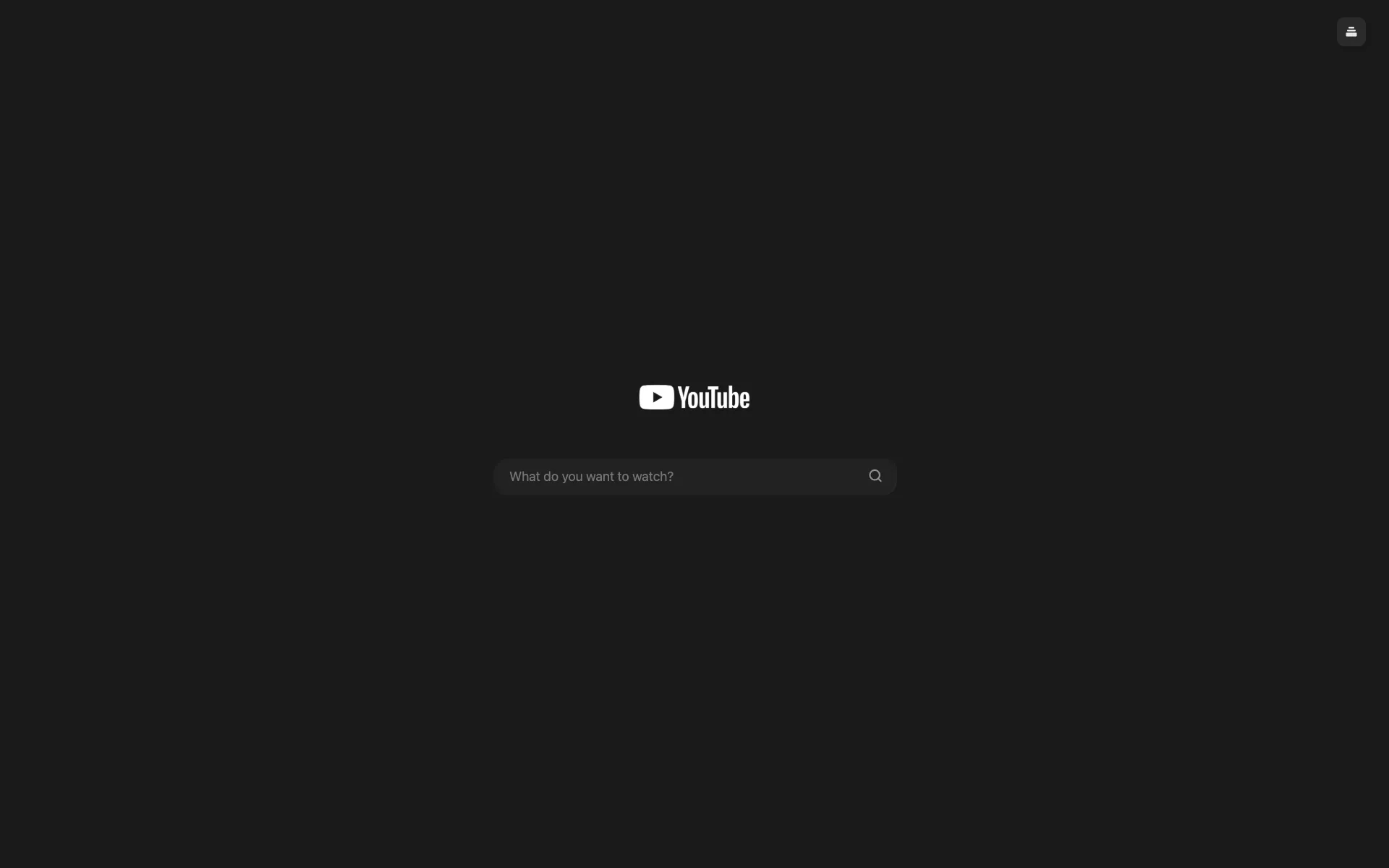
Focus changes the whole visit:
- The homepage feed, Shorts, suggested videos, and comments never render, and search results appear in the same minimal interface.
- When a video ends, you see your own saved library instead of a recommendation grid, so the next video is one you chose earlier.
- A focus session puts a timer on the visit: pick a length, and if you choose Lock In, the session cannot be ended early. You can also set Toobie to start every YouTube visit in Focus.
- You can take notes on any video in a side panel while you watch, free.
- Videos you save land in a library with two search modes: the free mode matches titles and channels, while the Pro mode searches inside the videos by what was said. That saves you time when you only want to watch the part of a video that is relevant, because you can search the phrase you remember, or a specific subject or talking point, instead of scrubbing through multiple videos to find it. Toobie can also skip the sponsor reads creators place mid-video, free for everyone, once you enable it in your settings. YouTube's own ads are not affected. Those segments come from the SponsorBlock community database, used under CC BY-NC-SA 4.0.
- Channels that reliably pull you off track can be blocked. Click the channel name on a search result or on the video you are watching, and while Focus is on, that channel's videos stop appearing in your results and its channel pages send you back.
Try a 30-minute learning session
A focused session does not need to be long. Use this structure the next time you need a tutorial or lecture. If you use Toobie, start a 30-minute focus session so the clock runs where you can see it.
Minutes 0 to 2: define the task
Start by writing one sentence that names the outcome:
By the end of this session, I will understand the chain rule
and solve ten practice problems.
Minutes 2 to 22: watch with a purpose
Open the chosen video with a note beside it, and write down the concepts that matter, timestamps worth returning to, examples to try, and questions to answer afterward. When a side question appears, add it to the note instead of chasing it:
Later:
- Review the product rule
- Ask whether the exam covers related rates
Minutes 22 to 28: apply what you learned
Do one practical thing while the video is fresh, whether that means working a practice problem, redoing the video's example with the video paused, or summarizing the idea in your own words, because applying the material is what turns watching into learning.
Minutes 28 to 30: close the loop
Ask one question: did I finish what I came here to do? If the answer is yes, close YouTube and move on, and if not, decide whether the task earns another session. Either way, you make that call rather than the next thumbnail.
Save unrelated thoughts for later
Distraction is not only entertainment. Mid-video, you remember a message to answer, an assignment to check, or a form to fill out, and unless it is urgent, the move is not to act on it but to park it:
Later:
- Reply to Sam
- Check when the essay is due
- Book the group study room
The thought is kept, the task in front of you survives, and the list gets ten minutes of your attention after the session instead of hijacking the middle of it. This works better than it sounds: experiments by psychologists E. J. Masicampo and Roy Baumeister found that unfinished tasks keep intruding on whatever you do next, and that writing a plan for them makes the intrusions stop.
Frequently asked questions
Can I hide YouTube recommendations but still watch videos?
Yes. Hiding recommendations does not touch the videos themselves. With Toobie in Focus mode, the homepage feed, suggested videos, and comments are gone, while search, direct links, and your saved library keep working.
How do I stop YouTube Shorts from distracting me?
YouTube's own controls stop short: you can hide the Shorts shelf for 30 days, and it comes back. Toobie's Focus mode replaces the surfaces that carry Shorts, the homepage and search results, so they stay out of your way while you work.
Is YouTube still useful for studying?
Yes. It works when you arrive with a specific question, choose a relevant video, take notes, and apply what you learned. It works against you when the platform picks the next activity.
What should I do if I get distracted anyway?
Treat it as a detour, not a failed session. Close the distracting page, reread your goal, and take the smallest next action: go back to the video, write one note, or work one problem.
Do I need to block YouTube completely?
No. Blocking the whole site also blocks the tutorials and lectures you need. If YouTube is part of how you learn or work, a calmer version of the site is easier to sustain than a wall you end up climbing over.
Make YouTube a tool again
You do not need a perfect attention span to learn online, and you do not need to change everything at once. Pick one clear task, open the video you need, hide the parts of YouTube that compete for your attention, apply one thing you learned, and leave when the task is complete. YouTube should support the thing you came to do, not keep replacing it with something else.